

Which models on MakerWorld are worth printing? These 5 types of practical and fun 3D printing models
If 3D printing makes “making things yourself” possible, then Bambu Lab's MakerWorld further lowers the barrier to finding models and starting printing.
From desktop organization and tool tidying to articulated toys and everyday gadgets, MakerWorld has accumulated a large number of models shared by creators. The models truly worth printing are not necessarily the ones with the most complex structures or the most parts, but rathermodels that, once printed, are genuinely useful, good-looking, and fun, and that showcase the value of 3D printing.
This article starts from several typical directions to see which models on MakerWorld deserve a spot on your “print list,” and also discusseshow third-party filament ANTINSKYcan give these models more material and color options.
01 | Desktop Organization: The Type of Model That Best Demonstrates the Value of 3D Printing
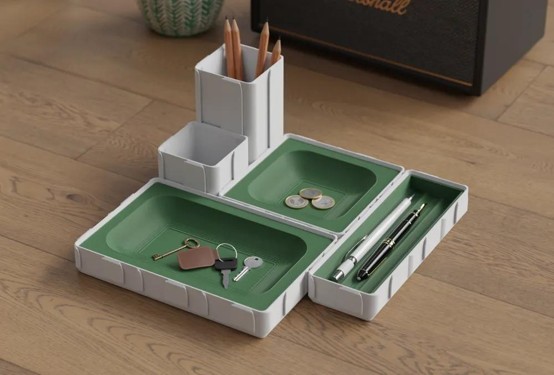
If you're new to MakerWorld, it's a good idea to start with desktop organizer models.
Pen holders, tool boxes, headphone stands, phone stands, printer tool storage boxes…… These items look simple, but they are highly suitable for 3D printing.
The reason is simple:
Standardized products solve “the needs of most people,” while 3D printing solves “your specific needs.”
MakerWorld has quite a few desktop organizer models. For example, theMid-Century Organizerfeatures a retro mid-century style design, with multiple independent storage compartments and a drawer structure; the page currently provides print profiles for various printers including X1, P1S, A1, and H2D.
Another model, theDesktop Organizer - Pencil Holderuses a sliding door design, requires no AMS, and no complex gluing, making it suitable for organizing small items like pens and office supplies.
Why recommend this category?
Because it's perfect for testing filament:
Surface smoothness
Layer line performance
Dimensional stability
Extrusion consistency
Visual effects between different colors
If you use ANTINSKY PLA or PLA Matte, you can make the same model look completely different just by choosing different colors.
For example:
Cream + Brown → Minimalist home aesthetic
Black + Gray → Industrial style
High-saturation contrasting colors → Memphis style
Earth tones → Vintage style
The same STL file can become a completely different piece of work simply by swapping in a different spool of filament.
02 | Modular Storage: Where 3D Printing Truly Gets “Better with Use”
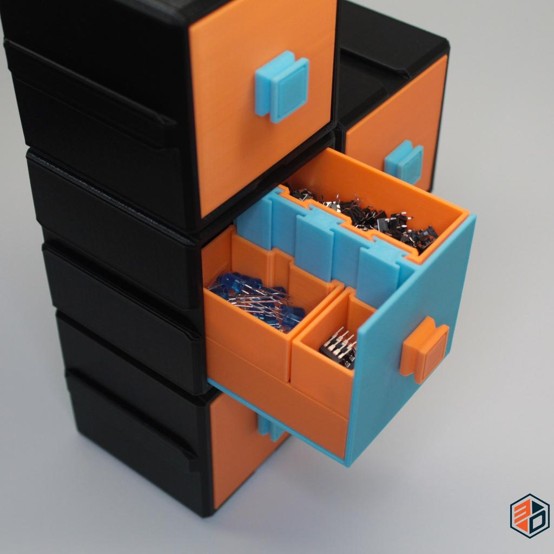
Even more interesting than regular storage boxes aremodular storage systems.
MakerWorld has many modular designs, such as theModular storage organizerwhich uses multiple independent compartments that can be combined through connecting structures, allowing you to add or adjust storage units according to your needs.
There are also desktop modular systems that split functions like pen holders, phone stands, note boxes, and small trays into different modules, which are then combined into a complete desktop system. Some models even use magnetic connections, allowing users to freely adjust the layout.
This type of model is especially good at highlighting the difference between 3D printing and traditional manufacturing:
Instead of buying a storage box with a fixed size, you print a storage system that fits your space perfectly.
How to choose ANTINSKY filament?
If appearance is the main priority:
PLA / PLA Matte
is suitable for desktop organizers, pen holders, display stands, small household items, etc.
If durability matters more:
PETG / PETG Matte
can be considered for storage parts that require some toughness, heat resistance, or long-term use.
For this type of model, filament is not just the medium that “prints the model out,” it also directly participates in the visual design of the final product.
03 | Printer Tool Storage: Printing “Companion Tools” for Your 3D Printer
There's another category of models that's perfect for MakerWorld:
making accessories for the 3D printer itself.
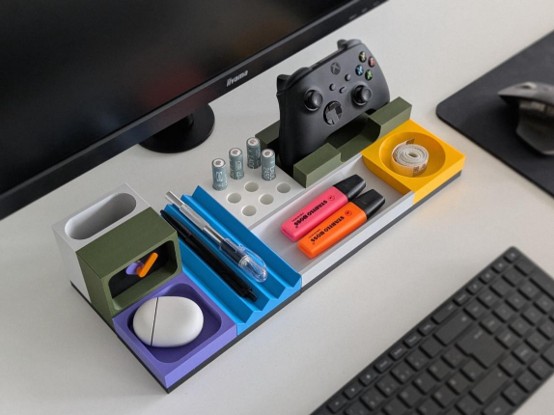
For example, scrapers, scissors, glue sticks, tweezers, nozzle tools, etc. If they're all scattered across the desk, they're very inconvenient to use.
On MakerWorld, you can find storage models specifically designed for Bambu Lab printer tools, such as theTool Organizer, whose model page provides print profiles for devices like P2S, P1S, A1, H2D, and X1.
There are also models specifically designed to store Bambu Lab scrapers, glue sticks, and other tools, which can be printed on a single build plate.
The biggest feature of this type of model is:
It's ready to use immediately after printing.
For people new to 3D printing, this is an easier way than printing a decorative figurine to get the feeling that “3D printing can actually solve real-life problems.”
04 | Articulated Models: The Type on MakerWorld That Most Easily Gets You “Addicted to Printing”
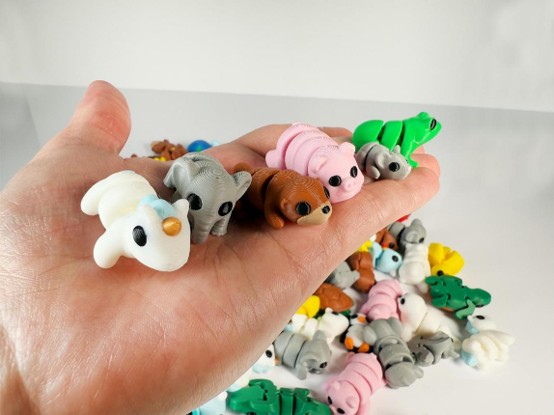
If storage models showcase the practicality of 3D printing, thenArticulated / Flexi modelsshowcase the fun side of 3D printing.
The biggest feature of this type of model is:
After printing, no complex assembly is needed — the model itself can move.
For example, in the Articulated series on MakerWorld, you can find a large number of models such as articulated snakes, dragons, hedgehogs, jellyfish, lizards, and hippos. Some models use a Print-in-Place design and can be completed in a single print.
Some articulated dragon models have very complex scale and joint structures. After printing, they can bend and sway, making them suitable both as desktop decorations and for filming 3D printing process videos.
Why is this type of model especially well-suited to PLA?
Because PLA has good molding performance and can accurately reproduce details in the model, such as:
Scales
Joints
Small structures
Surface textures
Fine decorative details
Moreover, articulated models are naturally great for playing with “color.”
For example, a dragon:
Gold → Collector's item style
Black and red → Sci-fi mechanical feel
Green → Fantasy creature feel
Fluorescent colors → Glow-in-the-dark toy feel
If you use ANTINSKY PLA Luminous or other materials with special visual effects, you can further change how the model looks under different lighting conditions.
05 | Functional Gadgets: Truly Bringing “Printing” into Everyday Life
Beyond desktop organizers and toys, MakerWorld also has a large number of very interesting everyday gadgets.
For example:
Drawer dividers
Cable organizers
Headphone stands
Phone stands
Cup holders
Key organizers
Wall hooks
Small tool boxes
Cabinet storage parts
Under-Desk drawers
Some of these models even solve problems that traditional products struggle to address.
For example, theUnder-Desk Drawer Organizeron MakerWorld can be installed under a desktop, making use of otherwise unused under-desk space to add drawer storage, and it features structures designed for different desk edge conditions.
This is also what I find most fascinating about 3D printing:
It's not about printing for the sake of printing, but because a small problem arises in daily life, so you print a solution that fits just right.
ANTINSKY × MakerWorld: The Model Is Just the Beginning; the Filament Determines the Final Result
MakerWorld provides the “design,” but the final result of 3D printing is also influenced by factors such as filament, print settings, and device condition.
The same model:
Printed with ordinary white PLA, it might be a simple desktop item;
Switched to matte PLA, it might become a decorative piece with a home-design feel;
Switched to marble-textured material, it might take on a visual effect similar to stone;
Switched to transparent or special-effect materials, it will present a completely different texture.
This is also the significance of third-party filament.
What ANTINSKY hopes to do is not just provide a filament that “can print,” but to give models on MakerWorld more material options.
For different types of models, you can choose based on the final use:
Model Type | Recommended Material Direction | Main Points of Focus |
Desktop figurines | PLA / PLA Matte | Appearance, color, surface texture |
Desktop organizers | PLA / PETG | Molding, durability |
Tool storage | PETG | Toughness, service life |
Articulated toys | PLA | Detail, joint molding |
Household items | PETG / PETG Matte | Practicality, surface finish |
Special visual models | Marble / Luminous, etc. | Texture, glow effects, visual presentation |
The Models Truly Worth Printing Aren't Necessarily the “Most Complex”
There are more and more models on MakerWorld, and when you first open it, it's easy to fall into the dilemma of “what exactly should I print?”
Actually, you can think about it differently.
Instead of looking for “the hottest model online,” it's better to prioritize models that fit your own needs:
Want to tidy up your desk → Print storage
Want to test filament → Print models with rich detail
Want to find some fun for your kids or yourself → Print articulated models
Want to solve a small problem in daily life → Search for functional accessories
Want to showcase 3D printing results → Choose models with complex textures and structures
The greatest charm of 3D printing has never been just turning a virtual model into a physical object.
Rather, it's when you realize:
“I need this thing, but there's nothing quite suitable on the market.”
You can open MakerWorld, find a base design, and then through size, color, material, or even structural adjustments, turn it into something truly your own.
And perhaps that is what makes MakerWorld the most worth exploring.


